
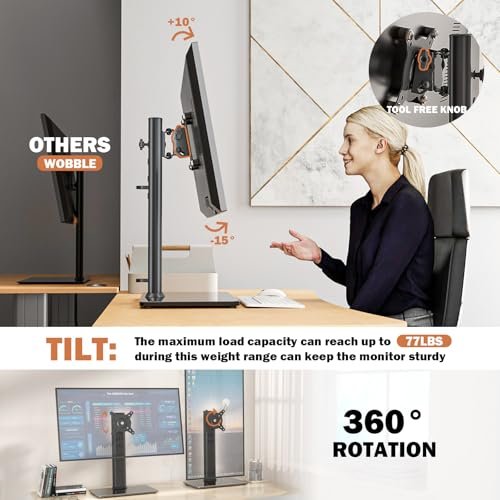
A height adjustable monitor stand improves screen height, posture, desk space, and daily comfort.
If your monitor sits too low, you may lean forward, raise your shoulders, or tilt your head all day. That small strain can make long work sessions feel much harder. A height adjustable monitor stand gives you a simple way to lift your screen and create a more natural viewing position. Some models use a VESA mount for fine adjustment, while others use a raised platform with storage space. I compared five popular options for build, fit, stability, adjustment range, and value so you can choose the right stand for your desk.
See the differences between my top picks at a glance.
| Product | Screen Fit | Adjustment | Load Capacity | Best For | Buy |
|---|---|---|---|---|---|
| HT05B-001 Free-Standing Stand | 13–32 inches | Height, swivel, rotation | Up to 77 lb | Large single monitors | View on Amazon |
| BoYata Metal Monitor Riser | Monitors, laptops, iMacs, TVs | Adjustable riser height | Check current listing | Storage and clean desks | View on Amazon |
| Cadcreo Single VESA Stand | 24–27 inches | One-hand height, swivel, tilt | 7.7–11 lb | Light VESA monitors | View on Amazon |
| MOUNTUP Single Monitor Stand | 13–32 inches | Height, swivel, tilt, rotation | 17.6 lb | Flexible home offices | View on Amazon |
| Amazon Basics 3-Level Riser | Monitors and laptops | Three stackable levels | Up to 22 lb | Simple budget setups | View on Amazon |
HT05B-001 Free-Standing Monitor Stand
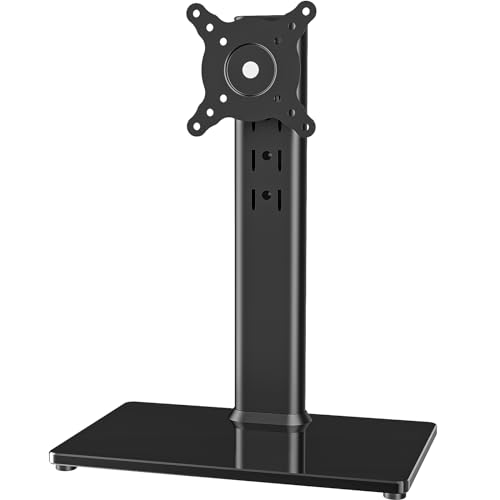
The HT05B-001 is a strong choice for users who want a freestanding VESA monitor mount instead of a basic shelf. It fits screens from 13 to 32 inches and supports one display up to 77 pounds, based on the listed product details. That high stated capacity gives it a wide range of possible uses. It also adds swivel, height adjustment, and screen rotation for a more flexible workstation.
I see this model as a practical choice for a large or heavy single monitor. The broad base helps keep the display planted on the desk, while the VESA connection keeps the screen secure. You should still confirm the monitor’s VESA pattern and weight before ordering. Its design suits people who want more control than a fixed monitor riser can provide.
Pros:
- Fits a wide 13- to 32-inch screen range
- Supports a high listed load of up to 77 pounds
- Offers height adjustment for a better viewing position
- Allows swivel and screen rotation
- Freestanding design does not need a desk clamp
- Works well for a single-monitor workstation
Cons:
- Requires a VESA-compatible monitor
- The large base may use more desk space than a simple riser
- It may offer more capacity than small, light monitors need
What Amazon Buyers Are Saying
Buyer feedback for this type of stand often focuses on its solid base, wide screen fit, and useful movement range. People who replace a weak factory stand tend to value the added height and the ability to turn the screen. Some buyers may find the assembly process less direct than a simple platform riser. As with any VESA mount, buyers also need to match the included hardware and mounting pattern to their monitor.
My Recommendation
I recommend the HT05B-001 when strength and adjustment matter most. It is especially appealing for a large single display or a user who wants swivel and rotation without attaching a clamp to the desk. Check the VESA fit and desk depth first. For the right monitor, this is one of the most capable options in this group.
BoYata Adjustable Metal Monitor Riser

The BoYata monitor stand takes a different approach from a VESA arm. It uses a height-adjustable metal riser that lifts a monitor, laptop, iMac, PC, or TV while leaving open space underneath. That lower space can hold a keyboard, notebook, game controller, or small accessories. The black metal design also gives the desk a clean and sturdy look.
This model suits people who want a simple lift without removing the monitor’s original stand. It can also help separate a laptop or screen from clutter on a crowded desk. The open shelf design makes daily storage easy. Before buying, I would confirm the current size, adjustment method, and weight details on the Amazon listing because these details matter for a safe fit.
Pros:
- Open space underneath adds useful storage
- Metal construction gives the riser a solid feel
- Works with monitors, laptops, iMacs, PCs, and some TVs
- Does not require VESA holes
- Simple design fits many home office styles
- Raises the screen while keeping the original monitor base
Cons:
- It does not provide the same swivel and tilt control as a VESA mount
- You must check the platform size before placing a wide monitor on it
- Open storage can collect dust and desk clutter
What Amazon Buyers Are Saying
Common buyer themes for this kind of BoYata riser include appreciation for its strong metal feel, clean appearance, and storage space. Users often like the way it raises a screen without complex mounting work. Some feedback may focus on adjustment limits or the need to tighten parts during setup. Buyers with very wide or heavy monitors should pay close attention to the platform dimensions and listed weight guidance.
My Recommendation
I recommend the BoYata riser for users who want a stable platform and storage, not a full-motion mount. It is a good fit for a laptop, iMac, or monitor with a factory stand. It also works well for people who do not want to drill, clamp, or attach a VESA plate. Choose another model if you need frequent tilt, rotation, or fine screen positioning.
Cadcreo Single VESA Monitor Stand

The Cadcreo single VESA stand targets users with a lighter 24- to 27-inch monitor. Its listed load range is 7.7 to 11 pounds, so weight checking is especially important here. The stand supports VESA 75×75 and 100×100 patterns. It also offers one-hand height adjustment, swivel, and tilt for quick changes during work.
I like the focus on simple daily movement. One-hand adjustment can help when two people share a desk or when you switch between sitting and standing. The narrow compatibility range makes this a more specialized choice than the HT05B-001 or MOUNTUP model. Confirm your monitor’s exact weight without its original stand, plus its VESA pattern, before purchase.
Pros:
- Designed for common 24- to 27-inch monitors
- Supports VESA 75×75 and 100×100 patterns
- Offers one-hand height adjustment
- Includes swivel and tilt movement
- Useful for users who change screen position often
- Compact single-monitor format keeps the setup focused
Cons:
- It has a limited listed load range of 7.7 to 11 pounds
- It may not fit monitors outside the listed size range
- VESA compatibility remains essential
What Amazon Buyers Are Saying
Buyer discussions around this type of stand tend to value easy adjustment and smooth access to tilt or swivel changes. Users with a correctly matched light monitor may find it more flexible than a fixed riser. The main concern is usually compatibility. A monitor that exceeds the stated weight range, uses a different VESA pattern, or has unusual rear housing may not fit safely.
My Recommendation
I recommend the Cadcreo for a light, VESA-ready 24- to 27-inch display. It offers useful movement without the extra size of a heavy-duty stand. I would not use it as a guess-based purchase. Check the monitor weight and VESA spacing first. When those numbers match, it offers strong value for a compact desk.
MOUNTUP Single Monitor Stand
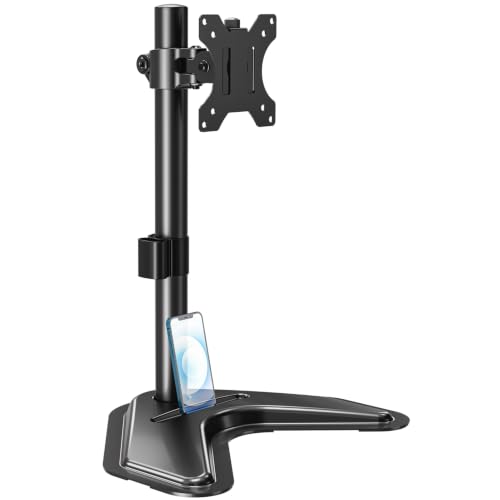
The MOUNTUP single monitor stand is a balanced option for users who want broad screen compatibility and several movement choices. It fits 13- to 32-inch displays and supports a listed load of up to 17.6 pounds. The design includes height adjustment, swivel, tilt, and rotation. It uses VESA 75×75 and 100×100 mounting patterns.
This height adjustable monitor stand makes sense for a typical home office, study desk, or gaming setup with one medium-size screen. The 17.6-pound limit covers many everyday monitors, but you should still check the complete monitor weight. Its movement range can help reduce glare and support portrait viewing when the display allows it. The freestanding base also avoids the need for a clamp-mounted arm.
Pros:
- Fits a wide 13- to 32-inch screen range
- Offers height, swivel, tilt, and rotation adjustment
- Supports VESA 75×75 and 100×100 patterns
- Handles a listed load of up to 17.6 pounds
- Freestanding base works on desks where clamps are not suitable
- Useful for work, study, and entertainment setups
Cons:
- It has a lower load limit than the HT05B-001
- It requires a VESA-compatible display
- The base takes more desk room than some clamp mounts
What Amazon Buyers Are Saying
Common review themes for the MOUNTUP stand center on its broad screen range and flexible movement. Buyers often like having one stand that can tilt, swivel, and rotate instead of using a fixed base. Some users may mention assembly time or the need to balance a monitor carefully after installation. As with other freestanding VESA stands, stability depends on correct mounting and a level desk surface.
My Recommendation
I recommend MOUNTUP as the best all-around choice for many single-monitor users. It offers more movement than a basic riser and covers a useful range of screen sizes. The 17.6-pound limit is the key detail to verify. If your monitor fits that limit and uses the correct VESA pattern, this model gives a strong mix of flexibility and value.
Amazon Basics Three-Level Monitor Riser

The Amazon Basics monitor riser offers a simple way to raise a screen or laptop. Its three-level stackable design lets you choose from several height positions without using a VESA mount. The riser uses durable ABS plastic and supports up to 22 pounds, according to the listed details. It also includes storage space that can help organize a small desk.
This model works best for buyers who want a low-cost, easy setup. You place the monitor on top, then adjust the level by changing the stack position. That makes it less flexible than a swivel mount, but it also keeps setup quick. It is a sensible pick for a fixed work area, a student desk, or a laptop station that needs a modest lift.
Pros:
- Three stackable height levels offer simple adjustment
- Supports monitors and laptops
- Listed capacity reaches up to 22 pounds
- Does not need VESA holes or mounting tools
- Storage organizer helps clear small desk items
- ABS plastic keeps the design light and easy to move
Cons:
- It does not provide swivel, tilt, or rotation
- Plastic construction may feel less premium than metal
- Height changes require repositioning the stack
What Amazon Buyers Are Saying
Buyers commonly value the riser’s simple setup, useful height steps, and storage area. It appeals to people who do not want to mount a screen or manage extra hardware. Some users may prefer a stronger material or more exact height control. Buyers should also keep the 22-pound listed limit in mind and place the screen so its weight stays centered.
My Recommendation
I recommend the Amazon Basics riser for simple desk upgrades and light-to-medium monitors. It is not the right tool for frequent screen movement, but it does the core job well: it lifts the display and adds order below it. If you want an affordable height adjustable monitor stand without VESA setup, this is the easiest option to consider.
How to Choose a Height Adjustable Monitor Stand
Choosing the right height adjustable monitor stand means matching the stand to your monitor, desk, and work habits. A good stand should hold the screen safely and place it at a comfortable height. It should also fit the space you have. I suggest checking these three points before you compare price or style.
1. Match the Stand to Your Monitor
Start with the monitor’s size, weight, and mounting pattern. A VESA mount uses a hole pattern on the back of the screen. Common patterns include 75×75 and 100×100 millimeters. The Cadcreo and MOUNTUP models list these patterns, but you should still check your monitor manual or product page.
Weight matters just as much as screen size. A large display may weigh more than a small office monitor. Remove the original stand from the weight calculation if the listing gives the screen-only weight. Never rely on size alone. The HT05B-001 has a much higher listed load than the Cadcreo, while the Cadcreo targets a lighter range. That difference can decide whether the stand stays stable.
2. Choose the Adjustment Style You Need
Think about how often you move your screen. A VESA stand with swivel, tilt, and rotation works well if you change viewing angles often. It can help with glare, shared work, portrait reading, and different seating positions. MOUNTUP offers a broad set of movements, while the HT05B-001 also suits users who want rotation and swivel.
A platform riser works better when the screen stays in one place. The BoYata model adds open storage, and the Amazon Basics riser offers three stackable levels. These designs are fast to set up and do not need VESA holes. They cannot match the fine movement of a mounted stand, but they often make more sense for a fixed desk.
3. Compare Stability, Desk Space, and Value
Look at the base before you buy. A freestanding stand needs a level surface and enough depth. A broad base can improve stability, but it also takes more desk room. Measure the area behind your keyboard and compare it with the stand dimensions shown on the product page.
Also check how the stand fits your daily routine. Storage below the screen can free space for a keyboard or notebook. A VESA mount can create a cleaner look, but it may take longer to install. A plastic riser can cost less and move more easily, while a metal stand may feel more solid. The best value comes from the features you will use, not from the longest list of specifications.
Final Verdict: Which Should You Buy?
I recommend the MOUNTUP as the best overall height adjustable monitor stand for most users. Choose the HT05B-001 for a heavier screen, BoYata for storage, Cadcreo for a light VESA display, or Amazon Basics for simple low-cost lifting.
Check screen weight, VESA fit, base size, and desk space before ordering. The right height adjustable monitor stand can make your workspace cleaner, safer, and more comfortable.
FAQs Of height adjustable monitor stand
What is the best height adjustable monitor stand for most users?
The MOUNTUP single monitor stand is the best all-around choice in this comparison. It supports 13- to 32-inch screens, includes several adjustment options, and supports a listed load of up to 17.6 pounds.
Do I need VESA holes for a height adjustable monitor stand?
You need VESA holes for the Cadcreo, MOUNTUP, and HT05B-001 mounting designs. The BoYata and Amazon Basics risers can lift a monitor without VESA mounting.
How high should a monitor stand raise my screen?
Set the screen so your eyes meet the upper part of the display without forcing your neck to bend. Your exact height depends on your chair, desk, monitor size, and viewing distance.
Can a monitor riser hold a laptop?
Yes. The BoYata and Amazon Basics risers are designed to work with laptops as well as monitors. Check the platform size and listed weight limit before use.
What should I check before buying a monitor stand?
Check the monitor’s weight, screen size, VESA pattern, desk space, and the adjustment range. These details help you avoid a poor fit or an unstable setup.