
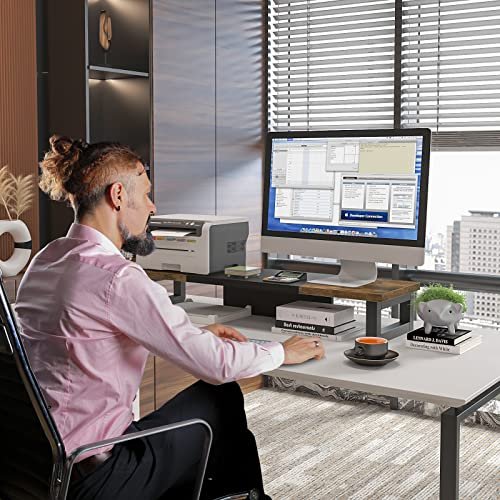
A wooden desktop monitor stand lifts your screen, saves desk space, and adds warm style to your office.
A low screen can make long work sessions feel tiring, while a crowded desk can slow you down. A wooden desktop monitor stand solves both problems with one simple upgrade. It raises your display, creates useful storage below, and gives your workspace a cleaner look. I reviewed five popular options with different layouts, materials, and features. Some suit dual monitors, while others work better for a laptop, printer, or small home office. The right choice depends on your screen size, desk depth, storage needs, and preferred wood finish.
See the differences between my top picks at a glance.
| Product | Best For | Storage | Material / Finish | Standout Feature | Buy |
|---|---|---|---|---|---|
| WESTREE Dual Monitor Riser | Two monitors | Open space | Wood and steel, rustic brown | Wide multi-use design | View on Amazon |
| Simple Trending Wood Riser | Wide desks | Two riser sections | Wood top, metal frame, antique brown | Two-pack flexibility | View on Amazon |
| FITUEYES Wooden Riser | Small desks | Two tiers | Oak finish | Compact shelf layout | View on Amazon |
| ROCDEER Bamboo Riser | Home offices | Drawer and shelf space | Bamboo wood | Drawer plus cable management | View on Amazon |
| BONTEC Dual Monitor Riser | Flexible dual setups | Large open storage | Wood finish, walnut | Adjustable length and swivel angle | View on Amazon |
WESTREE Dual Monitor Stand Riser
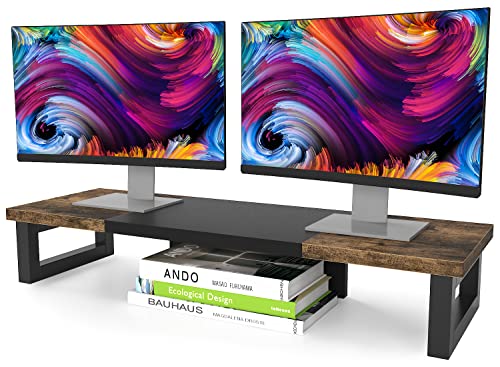
The WESTREE dual monitor riser is built for people who want a wide platform. Its wood-and-steel design gives it a stronger, more substantial look than a simple shelf. The rustic brown finish also suits workspaces that use warm wood tones. The listing presents it as a multi-purpose stand for two monitors, a laptop, printer, or TV.
Its broad shape creates open room beneath the raised screens. I like this layout for a keyboard, notebooks, a small dock, or other desk tools. It does not hide those items inside a drawer, so they stay easy to reach. This model makes the most sense when you need height and width at the same time.
Pros:
- Wide layout designed for two monitors
- Wood and steel construction offers a sturdy feel
- Rustic brown finish adds warmth to a desk
- Open space below supports keyboard and office storage
- Works with several desktop devices, including laptops and printers
- Useful choice for a broad home office or gaming desk
Cons:
- Its wide footprint may not suit a shallow or narrow desk
- Open storage leaves small items visible
- Rustic styling may not match every modern office
What Amazon Buyers Are Saying
Buyer feedback for products in this style often focuses on the extra width, simple setup, and useful space below the screen. The wood-and-metal look also appeals to shoppers who want more character than a plain black riser. As with any large stand, buyers should check desk measurements and monitor placement before ordering. Reviews may also differ based on the weight and size of each user’s equipment.
My Recommendation
I recommend the WESTREE for a wide desk and a dual-monitor setup. It is less appealing if you need a compact stand or closed storage, but its open design is easy to use every day. I rate it highly for width, style, and multi-purpose use.
| Category | Rating |
|---|---|
| Build and finish | 4.4/5 |
| Dual-monitor suitability | 4.6/5 |
| Storage usefulness | 4.3/5 |
| Desk-space value | 4.2/5 |
| Overall Rating | 4.4/5 |
Simple Trending Wood Monitor Stand

The Simple Trending set gives you two wood monitor risers instead of one fixed shelf. The listing describes an antique brown top with a sturdy metal frame. It also lists a 29-inch overall width, an 8.97-inch depth, and a 5.43-inch height. Those stated dimensions make it easier to compare the set with your available desk space.
The two-piece layout gives you more freedom than a single solid platform. You can place the risers side by side, separate them, or use one for a monitor and the other for a printer or laptop. The waterproof surface claim may help with normal office spills, but I still suggest wiping liquid quickly. This design suits users who want open storage and a flexible arrangement.
Pros:
- Two-piece design allows several desk layouts
- Useful 29-inch overall width for broad equipment setups
- Metal frames support a practical, stable shelf structure
- Antique brown finish works well with classic office decor
- Open space below can hold keyboards and small accessories
- Listed waterproof surface helps with routine desk use
Cons:
- Two separate pieces may shift if not placed with care
- The 29-inch width may overwhelm a small workstation
- Open shelving does not conceal cables or clutter
What Amazon Buyers Are Saying
Common buyer interest in a two-pack usually comes from the ability to change the layout. Shoppers also tend to value the stated width, open storage, and metal support frame. Some users may prefer a one-piece riser because it keeps both screens on one continuous surface. Before purchase, I would compare the listed depth and height with your monitor feet, keyboard, and desk edge.
My Recommendation
This is a smart option for anyone who wants a customizable wooden desktop monitor stand setup. It offers more placement freedom than a fixed shelf, but it requires careful positioning. I recommend it for wide desks, mixed devices, and users who enjoy changing their layout.
| Category | Rating |
|---|---|
| Build and finish | 4.3/5 |
| Layout flexibility | 4.7/5 |
| Storage usefulness | 4.4/5 |
| Space efficiency | 4.1/5 |
| Overall Rating | 4.4/5 |
FITUEYES Oak Wooden Monitor Stand
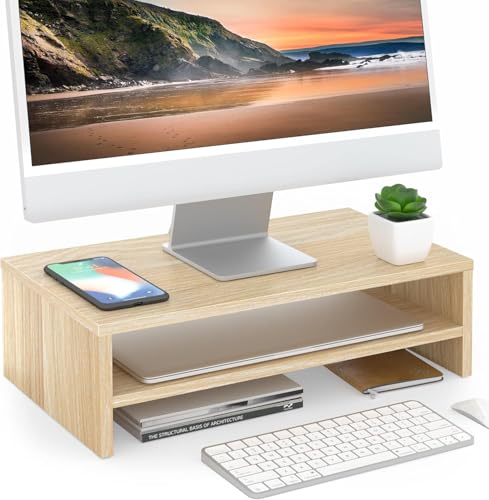
The FITUEYES riser takes a more compact approach. It has a two-tier desk storage shelf and an oak finish. The listing gives a 16.7-inch width, making it a practical candidate for a smaller desk, laptop area, or single monitor. Its shelf format separates the screen from office supplies without taking over the whole workspace.
I see this model as an organizer as much as a monitor riser. The upper level holds the screen, while the lower level can hold notebooks, a keyboard, or other small items. That layout can make a compact desk feel more orderly. It may not be the best pick for two large monitors, so measure your equipment before buying.
Pros:
- Compact 16.7-inch width suits smaller work areas
- Two-tier layout adds useful vertical storage
- Oak finish gives the desk a clean, natural look
- Works with a laptop, computer screen, or office supplies
- Helps separate display equipment from daily desk items
- Good fit for a focused single-screen workstation
Cons:
- Compact width limits use with wide dual-monitor setups
- Two tiers may not fit taller accessories below the screen
- Open shelves still leave stored items in view
What Amazon Buyers Are Saying
Buyers looking at compact risers often value the neat two-tier shape and the small footprint. The oak appearance can also appeal to users who want a lighter wood look. The main point to check is fit: a 16.7-inch platform may work well for one display but may not provide enough width for two large monitor bases. Feedback can vary with the size and weight of the equipment used.
My Recommendation
I recommend the FITUEYES for a single monitor, laptop, or small office desk. It gives you useful shelf space without a bulky footprint. If you need a wide wooden desktop monitor stand for two screens, choose one of the larger models instead.
| Category | Rating |
|---|---|
| Build and finish | 4.3/5 |
| Compact-desk fit | 4.7/5 |
| Two-tier storage | 4.5/5 |
| Large-monitor flexibility | 3.8/5 |
| Overall Rating | 4.3/5 |
ROCDEER Bamboo Monitor Stand With Drawer

The ROCDEER bamboo riser adds features that many simple shelves lack. Its design includes a drawer, storage space, and cable management. Bamboo gives it a light wood appearance that can suit a bright home office. The product is presented as an ergonomic computer riser for a desk, so it combines screen height with organization.
The drawer is the key reason to consider this model. It can keep small items such as charging cables, pens, or notes out of sight. Cable management may also help reduce loose wires around the monitor area. I would choose this style when a clean desk matters as much as screen elevation.
Pros:
- Drawer provides hidden storage for small desk items
- Cable management helps keep wires more orderly
- Bamboo finish adds a light, natural workspace style
- Combines monitor elevation with desk organization
- Useful for home offices and everyday computer work
- Storage design can reduce visible desktop clutter
Cons:
- Drawer storage has less capacity than a wide open shelf
- Users must check the product dimensions before fitting a large monitor
- Bamboo styling may not suit dark or industrial desk setups
What Amazon Buyers Are Saying
Buyers who choose organizers with drawers often care most about hidden storage and a cleaner cable area. The bamboo look also attracts people who prefer a natural material over plastic. The main review point to consider is how much storage the drawer can hold in daily use. I would also check the opening direction and available desk depth before ordering.
My Recommendation
The ROCDEER is my pick for a tidy home office that needs hidden storage. Its drawer and cable feature give it more organization value than a basic riser. Choose it when you want a cleaner desk, but confirm the dimensions and screen fit first.
| Category | Rating |
|---|---|
| Material and finish | 4.5/5 |
| Cable organization | 4.6/5 |
| Hidden storage | 4.6/5 |
| Monitor versatility | 4.1/5 |
| Overall Rating | 4.5/5 |
BONTEC Adjustable Dual Monitor Riser

The BONTEC stands out because it offers adjustable length and a swivel angle. Those features give users more control over how two monitors sit on the desk. The walnut finish adds a darker, refined look. The listing also mentions a smartphone holder and large storage, which makes this more than a simple screen shelf.
This model suits a changing workstation. You can adjust the length to match your screens and use the open area below for a keyboard, laptop, or office tools. The swivel feature may help align the displays for a more comfortable viewing position, though the exact adjustment range should be checked on the product page. I like it most for users who want flexibility instead of a fixed shape.
Pros:
- Adjustable length supports more flexible monitor placement
- Swivel angle helps users set a preferred screen position
- Walnut finish gives the desk a polished appearance
- Designed for dual monitors and other desktop equipment
- Smartphone holder keeps a phone within easy reach
- Large open storage area supports a cleaner desk layout
Cons:
- More moving features may need careful adjustment
- Users should confirm the fit for their monitor bases
- The larger design may not suit a very small desk
What Amazon Buyers Are Saying
Adjustable monitor risers tend to attract buyers who need control over screen spacing and viewing angles. The phone holder and storage area also add practical appeal for busy workstations. The most important review theme to examine is stability after adjustment, since setup and equipment weight can affect results. I suggest reading current buyer comments about fit, assembly, and movement before purchase.
My Recommendation
The BONTEC is the strongest choice here for a flexible dual-monitor workstation. It costs more in design complexity than a basic shelf, but the adjustable length and swivel angle can justify that difference. I recommend it for users who often change screen positions or want a more tailored setup.
| Category | Rating |
|---|---|
| Build and finish | 4.4/5 |
| Adjustment options | 4.8/5 |
| Dual-monitor use | 4.7/5 |
| Storage and extras | 4.6/5 |
| Overall Rating | 4.6/5 |
How to Choose a Wooden Desktop Monitor Stand
The best stand should fit your screen, desk, and daily habits. Do not judge a riser by appearance alone. Measure the space, check the listed features, and think about how you use your keyboard, cables, and accessories. A good wooden desktop monitor stand should raise the display without making the desk harder to use.
1. Match the Stand to Your Monitor Setup
Start with the monitor base. Measure its width and depth, then compare those numbers with the stand surface. A single laptop or monitor can work well on a compact shelf. Two large displays need a wider platform or an adjustable dual-monitor riser.
Also check the total equipment weight. A stand should support your monitor safely, but the product page may list its own weight limit. Never assume that a wood surface can hold every large screen. If you use a printer, laptop, or TV on the riser, include that device in your planning.
2. Choose Storage That Fits Your Work Style
Open storage works well for keyboards, notebooks, and items you use often. It lets you reach your gear fast. A drawer works better for small items that create visual clutter, such as cables, pens, and adapters.
Look at the space below the top shelf, too. A low shelf may not leave room for a tall keyboard or docking station. A two-tier monitor stand can add useful vertical space, but it may limit the size of items you place below. Choose the layout that matches your real desk routine.
3. Review Material, Finish, and Long-Term Value
Wood, bamboo, and wood-look surfaces can create a warmer feel than plastic. Steel frames may add a strong support structure. Check the product description for the stated materials, surface finish, dimensions, and care advice.
Finish matters for both style and daily use. Dark walnut and rustic brown hide some marks, while light oak and bamboo create a brighter look. Keep drinks on a coaster, wipe spills soon, and avoid placing a hot item directly on the surface unless the maker allows it.
Finally, compare the price with the features you will use. A basic shelf may offer the best value for a single monitor. An adjustable riser may be worth more if you need two screens, changing angles, or extra storage. The best buy is not always the cheapest model. It is the one that solves your desk problem without adding new limits.
Final Verdict: Which Should You Buy?
The BONTEC is my top pick for a flexible dual-monitor setup. For hidden storage, the ROCDEER is the better wooden desktop monitor stand. The FITUEYES suits small desks, while WESTREE and Simple Trending fit wider layouts.
Measure first, then choose the stand that matches your screen and storage needs. A well-sized wooden desktop monitor stand can improve comfort, order, and desk style.
FAQs Of wooden desktop monitor stand
What is the best wooden desktop monitor stand for two monitors?
The BONTEC and WESTREE are strong choices for two monitors. BONTEC offers adjustable length and swivel movement, while WESTREE provides a wide, open platform.
Will a wooden monitor riser improve desk organization?
Yes. The raised space can hold a keyboard, notebook, or accessories. Models with drawers or cable management can hide small items and loose wires.
How do I know if a monitor stand will fit my desk?
Measure your desk width and depth first. Then compare those measurements with the stand dimensions, monitor base size, and the space needed for your keyboard.
Is bamboo a good material for a monitor riser?
Bamboo offers a light natural look and can work well in a home office. Check the product details for its dimensions, support limits, finish, and care instructions.
Can I use a wooden desktop monitor stand for a laptop?
Many risers can hold a laptop, but you must check the platform size and support details. A compact two-tier model can work well for a laptop and office supplies.