
The best dual monitor stand saves desk space, improves screen comfort, and makes daily work feel far more organized.
If two monitors crowd your desk, a monitor arm can make a clear difference. It lifts screens off the surface, helps you set a better viewing angle, and leaves more room for a keyboard, notebook, or speakers. I reviewed five popular dual monitor stand options for different needs, including clamp mounts, free-standing bases, heavy-duty arms, and fast-install designs. The key is to match the stand with your monitor size, weight, VESA pattern, and desk thickness.
See the differences between my top picks at a glance.
HUANUO FlowLift Dual Monitor Stand

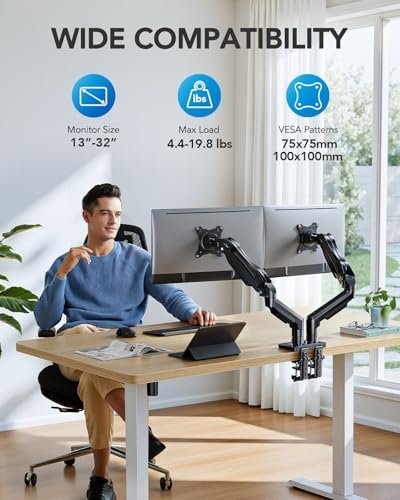
The HUANUO FlowLift is a strong choice for users who want broad screen support and a flexible desk mount. It fits monitors from 13 to 32 inches, with each arm rated for 4.4 to 19.8 pounds. That range covers many office, gaming, and home workstation displays. It also uses the common VESA 75×75 and 100×100 mounting patterns.
This model includes both C-clamp and grommet mounting options. That gives you more freedom when your desk shape or cable layout makes one method hard to use. The full-motion arms let you adjust height, tilt, swivel, and screen rotation. I like this design for mixed work because you can place two screens side by side, angle one toward a visitor, or turn one display for portrait reading.
Pros:
- Supports a wide 13–32-inch monitor range
- Holds up to 19.8 pounds per arm
- Includes both C-clamp and grommet bases
- Works with VESA 75×75 and 100×100 patterns
- Full-motion adjustment suits work and gaming
- Can free a large amount of desk space
Cons:
- Heavy monitors may need careful tension adjustment
- Clamp and grommet installation require desk access
- Very deep desks may limit the rear clamp position
What Amazon Buyers Are Saying
Amazon buyer feedback commonly focuses on the value of the adjustable arms and the sturdy feel after installation. Buyers often like the wide screen-size range and the ability to use either a clamp or a grommet base. Many also mention cleaner desks and easier screen alignment after replacing individual monitor feet.
The main concerns tend to involve setup time, arm tension, and desk compatibility. Some users need to tighten or loosen the tension screws before the screens stay at the desired height. As with any desk-mounted dual monitor stand, buyers also stress the need to check the desk thickness and monitor weight before ordering.
My Recommendation
I recommend the HUANUO FlowLift for buyers who want the most flexible overall setup in this group. It offers strong size support, two mounting choices, and useful movement range. It is worth buying when your desk can accept a clamp or grommet and both monitors fit the stated weight range.
VIVO STAND-V002F Free-Standing Stand

The VIVO STAND-V002F takes a different approach. It uses a free-standing base instead of attaching to the back edge of your desk. This makes it useful for renters, shared workspaces, and desks where clamps do not fit. It supports two LED or LCD monitors up to 27 inches and uses arms with support for VESA sizes up to 100×100 millimeters.
The stand keeps both monitors on one base, which can simplify installation. You do not need to drill a hole or clamp onto the desk. Its adjustable arms allow you to set the screen height and angle for a more even viewing position. The trade-off is that the base still occupies desk space, so it does not provide the same open area as a rear-mounted dual monitor stand.
Pros:
- Free-standing design needs no desk clamp
- Useful for rental homes and shared desks
- Supports two monitors up to 27 inches
- Adjustable arms help align two screens
- Supports common VESA mounting sizes up to 100×100
- Simple choice for users who cannot use a grommet
Cons:
- Base takes up valuable desk surface
- Screen size support stops at 27 inches
- May be less ideal for very deep desks or wide displays
What Amazon Buyers Are Saying
Amazon buyers often praise this stand for its simple free-standing setup. Many like that it avoids drilling and does not depend on a desk edge that can accept a clamp. Users also commonly point to the clean appearance once the two original monitor feet are removed.
Reported concerns usually center on the size and weight of the base. Buyers with larger screens may find a clamp-style stand more suitable. Some also note that careful tightening and level adjustment help prevent screen movement. These points are normal considerations for a free-standing monitor mount rather than signs of a design problem.
My Recommendation
I recommend the VIVO STAND-V002F when you need a no-clamp solution and use monitors up to 27 inches. It is practical for a rental, temporary desk, or shared office. Choose another model if your main goal is maximum free desk space or support for larger displays.
VIVO STAND-V002 Heavy-Duty Mount

The VIVO STAND-V002 is the heavy-duty option in this comparison. It holds two computer screens up to 30 inches and supports up to 22 pounds per arm. That makes it a better match for larger or heavier displays than many basic monitor arms. It uses a steel construction and supports VESA 75×75 and 100×100 mounting patterns.
This model includes both C-clamp and grommet installation. That gives you a secure way to attach it to many common office desks. The fully adjustable arms let you change height, tilt, swivel, and rotation. I see this as a useful option for users who want a firm dual monitor stand but do not need the wider 32-inch range offered by newer designs.
Pros:
- Supports monitors up to 30 inches
- Holds up to 22 pounds on each arm
- Steel construction suits heavier screens
- Offers both clamp and grommet mounting
- Supports VESA 75×75 and 100×100 patterns
- Provides multiple screen positioning options
Cons:
- Heavy-duty build can make installation more demanding
- Arm tension may need adjustment for lighter screens
- It may not fit desks with weak or very thin surfaces
What Amazon Buyers Are Saying
Amazon buyers often choose this model for its weight capacity and solid feel. Common positive comments focus on its ability to hold larger monitors and keep them in place after adjustment. Buyers also like having two installation methods, especially when a desk has a suitable cable hole.
Some buyer concerns relate to assembly and alignment. A heavy stand can take more time to position than a light free-standing model. Users also need to follow the weight limits and tighten the hardware evenly. A few buyers may find the arms more than they need for small, light displays.
My Recommendation
I recommend the VIVO STAND-V002 for users with heavier monitors or a larger 30-inch setup. It offers strong capacity and useful mounting choices at a practical price point. It is less attractive for small screens or for anyone who wants the fastest, simplest installation.
MOUNT PRO Free-Standing Monitor Stand

The MOUNT PRO dual monitor stand is another free-standing choice for a two-screen desk. It fits two monitors up to 27 inches, with a listed capacity of 17.6 pounds. It supports VESA 75×75 and 100×100 patterns. This combination makes it suitable for many standard office monitors and smaller gaming screens.
The arms offer height adjustment, swivel, tilt, and rotation. That is enough movement for most daily work positions, including a straight side-by-side layout or a slight inward angle. Since the base sits on the desk, you can move the whole unit without leaving clamp marks. Still, you should measure your available surface because the base does not create as much open space as a rear-mounted arm.
Pros:
- Free-standing design suits many desk types
- Supports two monitors up to 27 inches
- Offers height, tilt, swivel, and rotation changes
- Works with VESA 75×75 and 100×100
- Easy to relocate between work areas
- Useful for standard office and home setups
Cons:
- 17.6-pound capacity may not suit heavy displays
- The base uses part of the desk surface
- Large screens may feel crowded on a 27-inch design
What Amazon Buyers Are Saying
Amazon buyers commonly like this stand because it avoids permanent desk attachment. Users often mention the convenient adjustment range and the clean look of two screens on one central base. It can work well when a desk has no rear edge, no cable hole, or a surface that should not receive clamp pressure.
The most common limitations involve the footprint and monitor weight. Buyers with large displays may need a stronger clamp mount. Some also report that careful leveling helps both screens look even. These comments show why desk width, screen weight, and the base position matter before purchase.
My Recommendation
I recommend the MOUNT PRO for users who want a movable free-standing dual monitor stand for ordinary 24- or 27-inch screens. It delivers useful motion without desk clamps. I would choose a heavier model for large displays or a clamp arm for maximum desk space.
ErGear Fast-Install Dual Monitor Arm

The ErGear dual monitor arm targets users who want quick installation and broad monitor support. It fits screens from 13 to 32 inches and holds up to 19.8 pounds. It also supports VESA sizes up to 100×100 millimeters. This makes it a good match for many modern office displays, productivity screens, and moderate gaming monitors.
Its tool-free VESA mounting feature can make screen attachment less frustrating. You still need to secure the desk base and adjust the arm tension, but the monitor connection should be easier to manage. The full adjustable design lets you change the screen position to suit sitting height, task type, and glare. For a clean work area, the desk-mounted design also keeps the center of the desk more open.
Pros:
- Fits monitors from 13 to 32 inches
- Supports up to 19.8 pounds per screen
- Tool-free VESA mounting helps speed setup
- Offers full adjustment for different viewing positions
- Supports VESA patterns up to 100×100
- Works for both compact and larger screens
Cons:
- Desk thickness still affects installation
- Arm tension may need fine tuning
- Very heavy or unusually deep monitors need extra care
What Amazon Buyers Are Saying
Amazon buyers often highlight the fast-install design and the wide screen-size range. Many appreciate the tool-free VESA connection because it can reduce the effort of holding a monitor while starting small screws. Users also like the open desk area that comes with a rear-mounted arm.
Common concerns include the need to tune the arms for each monitor and the importance of checking the desk before installation. Some buyers expect a plug-and-play setup but find that leveling two arms takes time. That is common with adjustable monitor mounts, especially when two screens have different weights.
My Recommendation
I recommend the ErGear arm for buyers who value a quick monitor attachment and support for screens up to 32 inches. It is a strong all-around option for a modern home office. Check the desk and monitor measurements first, then allow time for final arm adjustment.
How to Choose the Best Dual Monitor Stand
Choosing the right dual monitor stand takes more than checking the lowest price. I first compare the monitor size, monitor weight, VESA holes, desk structure, and range of movement. These details decide whether the stand will feel stable and remain useful over time.
1. Match the Arms to Monitor Size and Weight
Start with the label on each monitor. Look for the screen size and weight without the original stand. The arm rating must meet or exceed that weight. If one monitor weighs 18 pounds, an arm rated for 17.6 pounds is not the right choice.
Also check the stated size range. A 32-inch screen may fit the mounting plate but still need more desk depth or arm reach. Leave space for the monitor body, power cable, and video cable. When the two screens have different weights, choose a model with separate tension adjustment if possible.
2. Check VESA Fit and Desk Mount Type
VESA refers to the hole pattern on the back of the monitor. Common patterns include 75×75 and 100×100 millimeters. Measure the holes or check the monitor manual before you buy. A stand cannot attach correctly when the plate does not match the screen.
Next, select the right base. A C-clamp works well on a sturdy rear desk edge. A grommet mount uses a hole in the desk and can provide a neat, firm attachment. A free-standing base needs no desk attachment, but it takes up surface space. Check desk thickness, underside clearance, and cable holes before choosing.
3. Consider Movement, Alignment, and Long-Term Value
A good dual monitor stand should let you set the screens at a comfortable height. Look for height, tilt, swivel, and rotation when you need flexible positioning. Rotation matters if you read long documents or code in portrait mode. Swivel helps when you need to turn a screen toward another person.
Think about how you work each day. A fixed side-by-side layout needs less movement than a shared desk or gaming station. Cable clips can keep wires tidy, while a tool-free VESA plate can speed installation. The best value comes from a stand that fits your current monitors and leaves enough capacity for a future upgrade.
Final Verdict: Which Should You Buy?
For most buyers, I recommend the HUANUO FlowLift because it supports 13–32-inch screens, offers two mounting methods, and provides strong adjustment range. Choose the VIVO STAND-V002 for heavier monitors or the VIVO STAND-V002F for a free-standing setup.
The right dual monitor stand can improve comfort, desk space, and screen control. Check VESA fit, weight, size, and desk support before ordering for the best result.
FAQs Of dual monitor stand
Will a dual monitor stand fit any two monitors?
No. Check each monitor’s size, weight, and VESA hole pattern first. The stand must support both screens within its listed limits.
Is a clamp mount better than a free-standing dual monitor stand?
A clamp mount saves more desk space, while a free-standing model works better when you cannot clamp or drill into the desk.
What VESA size do most dual monitor stands use?
Many models support VESA 75×75 and 100×100 millimeter patterns. Confirm the pattern on both monitors before purchase.
Can I use a dual monitor stand with a glass desk?
Use caution. A clamp can place strong pressure on glass. Check the desk maker’s guidance and consider a suitable free-standing option.
How much desk space does a dual monitor stand save?
It removes the two original monitor feet from the desk. A clamp model usually saves the most surface space, while a free-standing base still occupies part of the desk.