
A desk with cable management keeps cords hidden, work areas tidy, and daily tasks more comfortable.
Many home offices look fine until the monitor, laptop, lamp, speakers, and charger all need power. Then loose cords slide across the floor and gather behind the desk. I know how fast that mess can grow. A desk with cable management solves much of the problem with trays, flip-top compartments, or built-in routing space. I reviewed three adjustable models that suit work, study, and gaming. They differ in size, lift range, memory buttons, weight limits, and included accessories.
See the differences between my top picks at a glance.
DeskShow 60-Inch Electric Standing Desk

The DeskShow model gives you a wide 60 x 30-inch work surface. That size leaves useful room for two displays, a full-size keyboard, a mouse, and desk items. Its electric frame adjusts from 27.7 to 45.5 inches, so it supports both seated and standing work. The stated 250-pound capacity also gives it a strong advantage for heavier equipment.
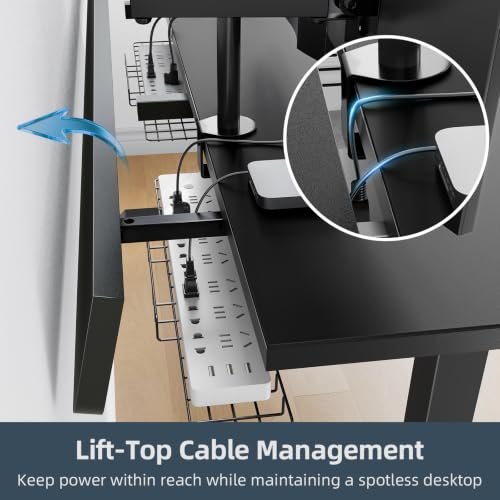
The flip-top cable management feature is the main reason I would consider this model for a busy workstation. It creates a place to hide power strips and route cords instead of letting them spread across the back edge. DeskShow also includes a mouse pad and clamp power strip, which can reduce the need to buy extra accessories. Three memory presets make repeated height changes easier during the workday.
Pros:
- Large 60 x 30-inch surface for multi-monitor setups
- Wide 27.7–45.5-inch electric height range
- High stated weight capacity of 250 pounds
- Flip-top cable management helps hide power gear
- Three memory presets support quick height changes
- Dual-beam frame design is suited to a larger desktop
- Includes a mouse pad and clamp power strip
Cons:
- The 60-inch width needs more floor space
- A larger frame may take longer to assemble than a compact desk
- Buyers should check the included instructions and hardware before installation
What Amazon Buyers Are Saying
Buyer feedback for this type of DeskShow listing tends to focus on the roomy desktop, height adjustment, and the value of included accessories. People who need space for more than one screen often look for this size first. The cable compartment also appeals to shoppers who want a cleaner rear edge without adding a separate tray.
As with many electric standing desks, buyers may mention assembly time, motor noise, desktop alignment, or the need to manage cords carefully during setup. Experiences can vary by order, floor surface, and installation quality. I recommend checking the latest Amazon reviews for current comments about packaging, assembly, and long-term motor performance before ordering.
My Recommendation
I recommend the DeskShow for users who want a wide standing desk with cable storage and a high listed load limit. It is especially suitable for a gaming setup, a two-monitor home office, or a workstation with bulky accessories. The included power strip and mouse pad add practical value. Make sure your room can handle its 60-inch footprint.
TIQLAB 47-Inch Standing Desk With Tray
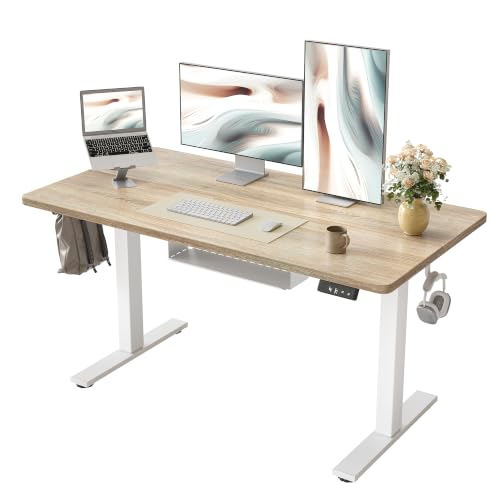
The TIQLAB standing desk measures 47.2 x 23.6 inches, making it a practical fit for a smaller bedroom, apartment, or home office. Its maple finish gives the room a warmer look than a plain black worktop. The electric lift system supports sitting and standing while you work, study, or play. Two memory presets let you save two preferred heights.
This model uses a cable management tray rather than a flip-top compartment. A tray can keep a surge protector and extra cord length off the floor while leaving the desktop more open. The smaller depth does mean you should measure your monitor stand and keyboard position before buying. For a laptop, one monitor, and basic accessories, the dimensions offer a useful balance between comfort and space.
Pros:
- Compact 47.2 x 23.6-inch footprint
- Maple surface adds a warm, simple look
- Electric height adjustment supports sit-stand work
- Built-in cable management tray helps lift cords from the floor
- Two memory presets make height changes simple
- Useful choice for a smaller home office or study zone
- Suitable for work, study, and gaming use
Cons:
- Less desktop depth than the 60 x 30-inch DeskShow
- Two presets offer less flexibility than models with three or four
- The supplied product details do not state the height range or load capacity
What Amazon Buyers Are Saying
People shopping for a compact standing desk often value the TIQLAB’s smaller footprint and cable tray. The maple color can also appeal to buyers who want a desk that feels less industrial. Common points to check in current buyer reviews include ease of assembly, smooth electric movement, tray size, and how well the desk fits a monitor arm or other accessories.
Some users may find the 23.6-inch depth ideal for a laptop or single-screen setup, while others may want more room for a deep monitor stand. That difference depends on the user’s equipment. I would read recent reviews and study the product images closely to confirm the tray position, controller layout, and available legroom before purchase.
My Recommendation
The TIQLAB is a sensible pick when floor space matters more than a large desktop. Its tray gives you a clear way to organize cables, and the two memory settings cover the basic sit-stand routine. I would choose it for a laptop, one monitor, or a light home office setup. I would not choose it first for a wide dual-monitor arrangement without measuring first.
ErGear 48-Inch Electric Standing Desk

The ErGear desk offers a 48 x 24-inch work surface and a black finish that suits most office or gaming rooms. Its electric frame lets you change the desk height instead of staying in one position all day. The product details list a 176-pound capacity, which gives room for a monitor, computer, speakers, and daily office tools. Four memory presets stand out at this price and size.
The stable steel frame supports a clean, practical workstation. While the supplied title does not name a separate tray or flip-top compartment, you can still build an effective cable management system with clips, ties, and a power strip mounted under the rear edge. Its 48-inch width sits between the compact TIQLAB and the larger DeskShow. That makes it a useful middle choice for people who need more room than a small desk but do not want a full 60-inch top.
Pros:
- Balanced 48 x 24-inch desktop size
- Four memory presets for flexible height changes
- Listed 176-pound weight capacity
- Stable steel frame design
- Black finish fits many office and gaming spaces
- Easy assembly is highlighted in the supplied product details
- Good middle ground between compact and large desks
Cons:
- The supplied details do not identify a built-in cable tray or flip-top compartment
- A separate cable tray or clips may be needed for a fully tidy setup
- The 24-inch depth may feel limited with a large monitor stand and deep accessories
What Amazon Buyers Are Saying
Buyers who choose the ErGear often focus on its four memory settings, steel frame, and practical 48-inch size. These features suit users who switch between several preferred working heights. Current Amazon reviews are also useful for checking assembly clarity, frame stability, control response, and how the desk performs with the buyer’s specific equipment.
The main point to watch is cable storage. Because the supplied product information does not clearly promise a dedicated tray or flip-top compartment, buyers should plan their own routing method. Reviews may discuss the frame and lifting action more often than cable organization. I suggest checking the latest listing photos and customer questions before assuming that a cable accessory comes in the box.
My Recommendation
The ErGear is a strong all-round option for a home office that needs four saved heights and a stable frame. It offers a useful desktop size without the footprint of a 60-inch desk. I would buy it with a simple under-desk tray, adhesive clips, or reusable cable sleeves. It earns a high score for flexibility, but the cable system needs more planning than the DeskShow or TIQLAB.
How to Choose a Desk With Cable Management
Choosing the right desk with cable management takes more than picking the desk with the most features. You need to match the desktop to your room, equipment, and daily habits. A good design should keep cords safe, leave enough legroom, and make height changes easy. I use the points below when comparing standing desks for a home office or gaming room.
1. Match the Desktop Size to Your Equipment
Start by measuring your monitor, keyboard, mouse, laptop, speakers, and any charging dock. Do not measure only the screen. The monitor stand can use more depth than expected, and a large keyboard can push the mouse toward the edge.
A 47.2 x 23.6-inch desk can work well for a laptop or one monitor. A 48 x 24-inch desk gives you a little more width for office items. A 60 x 30-inch desk gives much more freedom for two monitors, large speakers, or gaming gear. Leave open space around the keyboard so your wrists do not rest on the edge.
Also measure the room. Check the distance from the desk to a wall, window, door, and power outlet. A large desktop may fit on paper but make a small room feel crowded. Keep enough space behind the desk to plug in equipment and move the chair.
2. Study the Cable System, Not Just the Word “Management”
“Cable management” can mean different things. A flip-top compartment may hide a power strip inside the desk. A tray may hold cords below the desktop. Some desks only provide a clean frame, which means you must add clips or a separate tray.
Look for a path from the monitor to the rear edge and from the rear edge to the power outlet. Check whether the tray has enough room for your surge protector. A tray that holds only thin charging cords may not suit a desktop computer power brick.
Leave enough slack for the highest standing position. If you tie every cord tightly, the cable may pull when the desk rises. This can unplug equipment or damage the connector. I route each cord with a small loop, then secure it with a reusable tie. I also label both ends of cords when several devices use the same type of cable.
Keep power cords away from areas where your feet move. Do not create a tight bundle that blocks ventilation around a power brick. A neat desk should also remain safe and easy to service.
3. Compare Lift Range, Presets, and Long-Term Value
A standing desk should reach a comfortable seated height and a comfortable standing height for your body. Desk height needs vary by user, chair, shoes, and monitor position. If possible, set your elbows near a relaxed angle while typing. Keep the top of the monitor near eye level so you do not bend your neck for long periods.
Memory buttons save time. Two presets may cover your seated and standing positions. Three or four presets help when two people share the desk or when you use different heights for typing and drawing. The DeskShow lists three presets, the TIQLAB lists two, and the ErGear lists four.
Check the stated weight limit before adding equipment. Count the desktop items, monitor arms, speakers, computer, and anything stored on the desk. Do not treat the maximum capacity as a target. A little reserve can help the desk move with less strain and remain useful as your setup grows.
Finally, compare the included parts with the price. A desk that includes a power strip, mouse pad, tray, or other useful item may offer better value than a cheaper frame that needs many add-ons. Still, do not pay for features you will not use. The best desk with cable management is the one that fits your actual setup and keeps working after the first few months.
Final Verdict: Which Should You Buy?
The DeskShow is my top pick for a large workstation because it offers a 60 x 30-inch top, three presets, flip-top cable storage, and a 250-pound listed capacity. Choose TIQLAB for a smaller room. Choose ErGear for four presets and a balanced 48-inch size.
The right desk with cable management can improve comfort, order, and daily focus. Measure your room, count your devices, and confirm the latest Amazon details before buying.
FAQs Of desk with cable management
What is a desk with cable management?
It is a desk that includes a tray, compartment, routing space, or other design feature to organize power and device cords.
Which desk is best for a two-monitor setup?
The DeskShow is the strongest choice here because its 60 x 30-inch surface gives the most room for two monitors and accessories.
Is a cable tray better than a flip-top compartment?
Neither is always better. A tray keeps cords below the top, while a flip-top compartment can hide a power strip inside the desk. Choose based on your equipment and access needs.
How much desk space do I need for a home office?
A 47- or 48-inch desk can suit a laptop or one monitor. Choose a 60-inch desk when you need two monitors, speakers, or larger office tools.
Do standing desks include a power strip?
Not always. The DeskShow product details list a clamp power strip. Check each current Amazon listing before assuming another model includes one.
How do I stop cables from pulling when the desk rises?
Leave a small slack loop, secure cords below the desk, and test every cable at the highest desk position before regular use.