
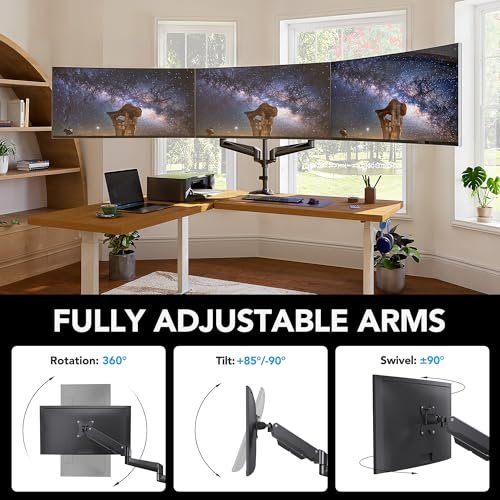
The best triple monitor arm saves desk space, improves screen control, and creates a cleaner multi-display setup.
If three monitors now cover most of your desk, you may struggle with poor viewing angles, loose stands, and tangled cables. A desk-mounted triple monitor arm can solve these issues by lifting the screens off the work surface and placing them at a better height. I reviewed five popular models for home offices, gaming desks, and workstations. I focused on screen size, weight support, VESA fit, movement, mounting options, setup, and value. This guide will help you choose a stable triple monitor arm that fits your screens and daily work.
See the differences between my top picks at a glance.
| Model | Screen Range | Weight Support | Mount Type | Best For | Buy |
|---|---|---|---|---|---|
| HUANUO 17–32 inch | 17–32 in. | Check current listing | Clamp and grommet | Large screens | View on Amazon |
| WALI GSDM003 | 13–32 in. | Up to 19.8 lb per arm | Desk mount | Flexible setups | View on Amazon |
| HUANUO 13–27 inch | 13–27 in. | Up to 19.8 lb per arm | Desk mount | Gaming and office use | View on Amazon |
| MOUNTUP Triple Stand | Up to 27 in. | 4.4–19.8 lb per arm | Desk mount | Mixed monitor weights | View on Amazon |
| ErgoFocus Triple Mount | Up to 32 in. | Up to 19.8 lb each | Desk mount | Large home offices | View on Amazon |
HUANUO 17–32 Inch Triple Monitor Mount

This HUANUO triple monitor arm stands out because it supports a broad screen range from 17 to 32 inches. That range gives it more room to grow than many basic three-screen mounts. It includes both clamp and grommet mounting options, so you can choose the method that best fits your desk. The arm design also supports swivel, tilt, and screen rotation for a more personal viewing layout.
This model suits users who want three screens for gaming, trading, editing, or office work. A 32-inch display can take up a lot of desk space on its original stand, so lifting it onto an arm can make a major difference. Still, you must check each monitor’s weight and VESA pattern before installation. A wide setup also needs a strong desk and enough rear clearance for the arms to move.
Pros:
- Supports a useful 17–32 inch screen range
- Offers clamp and grommet installation choices
- Swivel, tilt, and rotation help fine-tune each screen
- Works well for large office and gaming displays
- Frees a large amount of desk surface
- VESA compatibility supports common monitor mounting patterns
Cons:
- Large monitors can require careful balance and adjustment
- A wide three-screen layout needs substantial desk depth
- Installation may take time when aligning three displays
What Amazon Buyers Are Saying
Amazon review patterns for this type of HUANUO mount often focus on the clean desk gained after removing three factory stands. Buyers commonly value the range of movement and the option to use a grommet mount when a clamp does not suit the desk. Some users also note that alignment takes patience, especially when three screens have different bezels or stand heights. As with any monitor arm, buyers should read the current listing and recent reviews for updated hardware details before ordering.
My Recommendation
I recommend this model for users with medium or large monitors who want flexible mounting options. It is a strong choice for a home office, gaming station, or work desk that can handle a wide three-screen layout. I would not choose it without first checking desk thickness, monitor weight, and rear space. Based on its range and adjustment options, it offers very good value.
| Category | Rating |
|---|---|
| Screen range | 4.7/5 |
| Adjustment control | 4.5/5 |
| Mounting flexibility | 4.6/5 |
| Desk-space savings | 4.6/5 |
| Overall rating | 4.6/5 |
WALI GSDM003 Triple Monitor Arm

The WALI GSDM003 is built for users who want a broad compatibility range without moving into a large premium stand. It supports monitors from 13 to 32 inches and lists support of up to 19.8 pounds per arm. That makes it suitable for many common office and gaming monitors. Its swivel, tilt, and rotation functions allow a flat, curved, or mixed viewing arrangement.
I like the flexibility this WALI triple monitor arm offers for desks with different screen sizes. You can use three smaller panels, three medium panels, or a combination that suits your work. The VESA 75 x 75 and 100 x 100 patterns cover many standard displays. However, the final setup depends on the true weight of each monitor, not only its screen size.
Pros:
- Wide 13–32 inch compatibility range
- Supports up to 19.8 pounds per arm according to the listing
- Fits common VESA 75 x 75 and 100 x 100 patterns
- Useful swivel, tilt, and rotation adjustment
- Good choice for mixed-size monitor arrangements
- Compact desk mount design can replace three monitor bases
Cons:
- Large and heavy screens may need extra care during adjustment
- Three-arm alignment can take time during setup
- It may not suit desks with weak tops or limited rear clearance
What Amazon Buyers Are Saying
Common Amazon review themes for this WALI model include better desk organization, useful screen movement, and good support for standard monitor sizes. Buyers often appreciate the ability to turn a side display toward them or rotate one screen for documents. Some users report that cable routing and final alignment need careful work. The most useful buyer feedback usually comes from people who list their monitor model, weight, and desk thickness, so check those details in current reviews.
My Recommendation
This is one of the best choices for shoppers who want broad screen compatibility and a stated 19.8-pound arm limit. I would shortlist it for a three-monitor office, gaming, or finance setup. Make sure your desk can support the mount and that the monitor weight excludes only removable stands when appropriate. It earns a strong rating for flexibility and practical value.
| Category | Rating |
|---|---|
| Compatibility | 4.6/5 |
| Weight capacity | 4.5/5 |
| Movement | 4.4/5 |
| Setup value | 4.4/5 |
| Overall rating | 4.5/5 |
HUANUO 13–27 Inch Triple Monitor Arm

This HUANUO model targets users with smaller and mid-size screens. It supports monitors from 13 to 27 inches and lists an arm capacity of up to 19.8 pounds. That makes it a practical fit for many 24-inch and 27-inch displays. It also supports VESA 75 x 75 and 100 x 100 mounting patterns.
The layout offers the core movements most people need, including tilt, swivel, and rotation. I see this model as a good match for a compact gaming desk, a study area, or a work-from-home station. Smaller screens are often easier to align than 32-inch displays, so the setup can feel less demanding. You still need to measure desk depth because three monitors can extend far beyond the rear edge when the arms sit at full reach.
Pros:
- Designed for common 13–27 inch monitors
- Supports up to 19.8 pounds per arm as listed
- Includes common VESA 75 x 75 and 100 x 100 support
- Tilt, swivel, and rotation improve viewing comfort
- Well suited to compact desks and smaller displays
- Useful for both office work and gaming
Cons:
- It does not target screens larger than 27 inches
- Arm reach may limit very wide or curved layouts
- Users must confirm the exact monitor weight before buying
What Amazon Buyers Are Saying
Amazon buyers commonly look at this model for a cleaner setup with three 24-inch or 27-inch monitors. Review discussions tend to focus on easier desk organization, screen adjustment, and the need to tighten the joints during final positioning. Some buyers may find that thick desks, heavy displays, or unusual monitor backs make installation less simple. Read the latest reviews for your exact screen size because real-world results can vary with monitor design.
My Recommendation
I recommend this HUANUO mount for users who already own three smaller monitors. It avoids paying for a mount designed around much larger screens while still offering useful adjustment. It is not the right choice for a 32-inch display or an especially wide ultrawide-style arrangement. For standard office and gaming monitors, it delivers a good mix of price, features, and space savings.
| Category | Rating |
|---|---|
| Fit for 13–27 inch screens | 4.7/5 |
| Adjustment range | 4.4/5 |
| Compact desk use | 4.6/5 |
| Build and stability | 4.3/5 |
| Overall rating | 4.5/5 |
MOUNTUP Triple Monitor Stand

The MOUNTUP triple monitor stand supports three screens up to 27 inches. Its stated load range runs from 4.4 to 19.8 pounds per arm, which is useful when your monitors do not weigh the same. That range can help with a setup that combines a light side display with heavier main screens. The black finish also fits most gaming and office desks without drawing much attention.
I see this mount as a practical option for a standard three-monitor workstation. It is most suitable for buyers who want a clear load range and do not need support for screens above 27 inches. The lower weight limit matters because some very light monitors may fall below the listed range. As always, check the current product instructions and confirm your displays meet both the weight and VESA requirements.
Pros:
- Supports three monitors up to 27 inches
- Lists a 4.4–19.8 pound range for each arm
- Can suit setups with different monitor weights
- Helps remove three bulky monitor bases from the desk
- Simple black design fits work and gaming spaces
- Offers a practical choice for standard-size screens
Cons:
- It does not support monitors above 27 inches
- The minimum listed weight may exclude very light screens
- Users with deep or thick desks should measure before installation
What Amazon Buyers Are Saying
Review patterns for this MOUNTUP model often center on the value of getting three monitors onto one desk mount. Buyers tend to like the cleaner surface and the ability to set side screens at an angle. Common setup concerns include reaching the rear clamp, balancing the arms, and keeping bezels level. These points are normal for multi-monitor mounts, but they show why a careful installation matters more than speed.
My Recommendation
I recommend MOUNTUP for a typical three-screen desk with monitors under 27 inches. Its stated weight range makes it worth considering when your screens differ in weight. I would choose another model if you plan to upgrade to larger displays soon. For a stable, standard-size setup, it provides good function without unnecessary extras.
| Category | Rating |
|---|---|
| Weight-range flexibility | 4.5/5 |
| 27-inch monitor fit | 4.5/5 |
| Desk organization | 4.5/5 |
| Upgrade flexibility | 4.0/5 |
| Overall rating | 4.4/5 |
ErgoFocus 32-Inch Triple Monitor Mount

The ErgoFocus triple monitor arm targets users who need support for larger computer screens. The listing states that it works with screens up to 32 inches and holds up to 19.8 pounds on each arm. It uses VESA 75 x 75 and 100 x 100 mounting patterns, which cover many common monitors. This makes it a good candidate for a large home office or a workstation with three medium-size displays.
Large screens need more planning than small panels. You need enough desk depth, a firm mounting point, and space behind the desk for the arms to move. The ErgoFocus design can help create a more open desktop, but it cannot remove the physical width of three 32-inch screens. I suggest placing the monitors on the desk first to test the intended layout before you attach the mount.
Pros:
- Supports screens up to 32 inches according to the listing
- Holds up to 19.8 pounds per arm as listed
- Fits VESA 75 x 75 and 100 x 100 patterns
- Well suited to large home-office displays
- Creates useful space below the monitors
- Offers a practical path away from three separate stands
Cons:
- Three large screens can make the desk feel visually wide
- A weak desk may not provide enough support
- Precise leveling may take more effort with larger monitors
What Amazon Buyers Are Saying
Amazon review themes for large-screen triple mounts usually include praise for extra desk space and improved screen height. Buyers also tend to discuss the need for a solid desk, careful leveling, and enough room behind the work surface. Some setups may need more than one adjustment pass before all three displays sit evenly. I recommend comparing current buyer photos and comments with your monitor sizes before making a final decision.
My Recommendation
This ErgoFocus model is worth considering if you want a large-screen triple monitor arm and your desk can support it. It fits users who value open desk space and a wide visual workspace. I would avoid it for a shallow desk or a cramped corner because three large monitors need room to spread. Its capacity and screen range make it a strong option for larger displays.
| Category | Rating |
|---|---|
| Large-screen support | 4.6/5 |
| Weight capacity | 4.5/5 |
| VESA fit | 4.4/5 |
| Large-desk value | 4.4/5 |
| Overall rating | 4.5/5 |
How to Choose a Triple Monitor Arm
Choosing a triple monitor arm takes more than checking the number of screens it holds. A good mount must match your monitor weight, VESA holes, desk, and viewing plan. It should also leave enough room for cable routing and daily movement. The following checks can help you avoid a poor fit.
1. Match the Arm to Screen Weight and VESA Size
Start with the monitor weight after you remove the original stand. Compare that number with the arm limit for each position. Do not assume that a 27-inch monitor weighs the same as another 27-inch model. Panel type, speakers, stands, and built-in hardware can change the weight.
Next, check the mounting holes on the back of each display. VESA 75 x 75 and 100 x 100 are common patterns, but you should confirm the exact pattern in the monitor manual. The mount must support all three screens, not just the center panel. If your monitor has a recessed mounting area, check whether the included screws and spacers can fit.
2. Measure the Desk, Screen Width, and Arm Reach
Measure the desk thickness before buying. A clamp needs a firm edge and enough clearance for its plate. A grommet mount needs a suitable hole through the desk. Also measure the space behind the desk. The arms may extend backward as you angle the side monitors.
Think about the final screen shape. Three 24-inch monitors need less width than three 32-inch monitors. A flat layout may need more desk width, while an angled layout can bring the side screens closer. Place cardboard boxes or the monitors themselves on the desk to test the footprint. This simple step can prevent a costly mismatch.
3. Compare Movement, Stability, and Long-Term Value
Look for the movements you will use. Tilt changes the screen angle. Swivel turns the display from side to side. Rotation lets you place a monitor in portrait mode. Height adjustment helps bring the top of the screens near eye level, which supports a more comfortable viewing position.
Stability matters as much as movement. A mount that feels loose can make typing, gaming, or video work frustrating. Tighten each joint as directed, and avoid placing more weight on an arm than the listing allows. Cable clips can keep wires from pulling on the screens, but do not bundle cables so tightly that they restrict motion.
Finally, compare the total value rather than only the price. A cheaper mount may work well with three small monitors but limit future upgrades. A broader model may cost more but support larger screens for longer. The best triple monitor arm is the one that fits your current displays, desk, and work habits without forcing you to compromise on safety or comfort.
Final Verdict: Which Should You Buy?
For most buyers, the HUANUO 17–32 inch model is the best overall pick because it supports larger screens and offers clamp and grommet mounting. The WALI GSDM003 is a close choice for broad compatibility and stated arm capacity.
Choose the best triple monitor arm by checking weight, VESA fit, desk strength, and available space. A careful match will create a cleaner, more comfortable, and more useful multi-screen workstation.
FAQs Of triple monitor arm
Can one triple monitor arm hold three different monitor sizes?
Yes, many models can hold different sizes if each screen meets the listed weight, VESA, and size limits. Check every arm separately before installation.
What VESA pattern do most triple monitor arms use?
Many triple monitor arms support VESA 75 x 75 and 100 x 100 patterns. Always confirm the pattern on each monitor and the current mount listing.
Is a triple monitor arm safe for a glass desk?
A clamp can place strong pressure on glass. Use only a mount and desk combination approved by the desk maker, or choose a safer mounting solution.
How much desk space does a triple monitor arm need?
The mount needs room for its base, arm movement, and cable path. Three larger screens also need enough width and depth for a comfortable viewing angle.
Can I rotate one monitor vertically on a triple monitor arm?
Many models include screen rotation, but the display must clear the desk and nearby screens. Check the product instructions before using portrait mode.