
Choosing the best under desk cable management tray keeps cords neat, safe, and easy to reach.
A desk can look clean on top yet feel messy below. Power cords, monitor cables, chargers, and USB wires often fall into a tangled pile. An under desk cable management tray solves this problem without taking space from your work area. I reviewed five clamp-mounted and screw-mounted options for home offices, gaming desks, and standing desks. I focused on mounting style, tray size, material, capacity, and daily ease of use.
See the differences between my top picks at a glance.
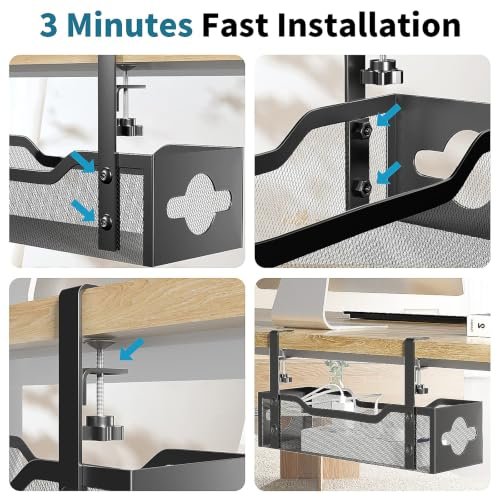
No-Drill Metal Mesh Cable Tray

This no-drill under desk cable management tray uses a metal mesh design and a clamp mount. The design suits renters and anyone who does not want to make holes in a desk. The mesh base lets you place power strips, adapters, and loose cords in one open area. Its two-hole cable layout also helps guide wires toward the devices they serve.
I see this model as a practical choice for a basic home office or compact gaming desk. The open sides make it easier to add or remove a cable without taking down the tray. Clamp mounting also makes it simple to adjust the position during setup. Before buying, measure your desktop edge and check the clamp clearance, since desk thickness can affect fit.
Pros:
- No-drill clamp installation helps protect the desktop.
- Metal mesh supports everyday cable and power-strip storage.
- Open construction makes cables easy to reach.
- Two cable openings help separate wires by direction.
- Works well for home office and standing desk setups.
- Removable mounting makes later desk changes easier.
Cons:
- The compact layout may not suit a large multi-monitor setup.
- Clamp fit depends on the thickness and shape of the desk edge.
- Open mesh may not hide cables as fully as a closed tray.
What Amazon Buyers Are Saying
Buyer feedback for no-drill cable trays commonly centers on quick installation and the benefit of avoiding desk holes. Users who have a compatible desk often value the clamp design because they can reposition it during cable cleanup. The main point to verify in current reviews is clamp fit, since desk thickness and underside supports vary. Buyers with many large adapters may also prefer a longer tray.
My Recommendation
I recommend this tray for shoppers who want a simple, affordable way to lift cords from the floor. It offers useful access and easy mounting, but it is not the strongest choice for a very large workstation. Check your desk measurements before ordering. For a small or medium setup, it is worth considering.
| Category | Rating |
|---|---|
| Build quality | 4.2/5 |
| Cable access | 4.4/5 |
| Mounting ease | 4.5/5 |
| Capacity | 4.0/5 |
| Overall rating | 4.3/5 |
Univivi 32-Inch Steel Cable Tray

This Univivi under desk cable management tray gives you a longer steel platform for cord storage. Its 32-inch length can cover a useful section of a wide desk. The tray supports both a no-drill C-clamp setup and a screw mount, which gives you more installation choice. That mix makes it suitable for users who want a temporary setup now and a more fixed setup later.
The steel construction should appeal to shoppers who want a firm tray under a work surface. A long tray can hold more than a small organizer, but it also needs a clear area beneath the desk. I would plan the cable layout before mounting it, especially if you use a surge protector, laptop dock, and several monitor leads. Keep heavier items spread across the tray instead of placing all weight in one spot.
Pros:
- 32-inch length covers more desk width than compact trays.
- Steel material offers a firm base for normal office cables.
- C-clamp mounting avoids drilling during initial setup.
- Screw-mount option can provide a more fixed installation.
- Useful for dual-monitor and home office cable layouts.
- Long coverage can reduce separate cable holders under one desk.
Cons:
- A 32-inch tray may be too long for a small desk.
- Steel construction can add more weight than fabric.
- Screw mounting requires tools and suitable space under the desk.
What Amazon Buyers Are Saying
Common buyer discussion around longer steel trays focuses on the extra room and the value of having two mounting methods. Users with wide desks often look for enough length to hold a power strip and route several cords in one place. The most important review details to compare are clamp stability, desk compatibility, and installation steps. Some buyers may find that a long tray needs careful placement to avoid legs, drawers, or desk frames.
My Recommendation
This is one of my stronger picks for a wide home office desk. The 32-inch format gives you room to sort several cable groups, while the clamp and screw options add flexibility. I would choose it over a compact tray when your desk has enough open underside space. It is a good fit for organized, medium-to-large workstations.
| Category | Rating |
|---|---|
| Steel build | 4.5/5 |
| Available space | 4.7/5 |
| Mounting flexibility | 4.6/5 |
| Desk compatibility | 4.1/5 |
| Overall rating | 4.5/5 |
Univivi 36-Inch Fabric Cable Tray

This 36-inch Univivi tray takes a different approach with a fabric cable management design. The long format gives it the most listed coverage among the products in this review. It uses clamp and screw mounting, so you can select the method that suits your desk and how permanent you want the setup to be. The fabric style can create a softer look than an exposed metal mesh tray.
I would consider this model for a large desk with many cables and several power adapters. Its wide span may help group cords from monitors, speakers, a computer, and charging devices. Still, length alone does not replace good cable routing. Leave room near the ends for plugs and avoid bending cables sharply where they enter the tray.
Pros:
- 36-inch length offers broad coverage under a large desk.
- Fabric construction gives the setup a softer visual finish.
- Large capacity suits busy work and gaming stations.
- Clamp mounting can avoid permanent desk changes.
- Screw mounting offers another installation path.
- Useful for grouping cables across a long desktop.
Cons:
- The long size may not fit desks with frames or drawers below.
- Fabric may be less rigid than a steel cable basket.
- Large trays need careful planning to prevent loose cable buildup.
What Amazon Buyers Are Saying
Buyer interest in this type of tray usually comes from its long size and larger storage area. People with several devices often look for a way to collect cords across a wide desk rather than use multiple small clips. Reviews should be checked for comments about fabric support, clamp fit, and ease of assembly. A few installation details can matter more than the listed length when the desk has a thick apron or crossbar.
My Recommendation
I recommend this tray for a large workstation where capacity matters most. It is less appealing for a narrow desk because unused length can make placement harder. The fabric format may also suit people who want a less industrial look. If you have many cables and a clear underside, this is a strong high-capacity option.
| Category | Rating |
|---|---|
| Capacity | 4.7/5 |
| Desk coverage | 4.8/5 |
| Mounting options | 4.5/5 |
| Structure | 4.1/5 |
| Overall rating | 4.5/5 |
Mzmaxy 25-Inch Clamp Cable Tray

The Mzmaxy cable tray measures 25 inches and targets users who want useful storage without a long rail. Its clamp design supports a no-drill installation for many desks. The tray can help hold loose cords and small power accessories below the work surface. A moderate length also makes it easier to fit around desk legs, drawers, and frame parts.
This model makes sense for a standing desk or a compact office desk with a few main devices. I would use it to organize a power strip, charger cords, and monitor cables rather than a large collection of bulky adapters. The clamp should sit on a solid, flat desk edge for the best result. Measure the edge first, then check that the tray will not interfere with the desk lift range.
Pros:
- 25-inch length balances storage space and desk fit.
- No-drill clamp design suits renters and temporary offices.
- Good match for compact and mid-size workstations.
- Useful under a sit-stand desk when placed away from moving parts.
- Helps lift cords off the floor and away from feet.
- Smaller size can simplify cable sorting.
Cons:
- It may not hold a large power strip and many adapters together.
- Clamp fit can vary with desk thickness and underside shape.
- Some users may want extra cable ties for final routing.
What Amazon Buyers Are Saying
Buyers who choose a 25-inch tray often want a middle ground between a small cable holder and a full-width basket. Typical review points include the convenience of clamp mounting and the ability to clear cords from the floor. Shoppers should pay close attention to comments about desk fit and available tray depth. People with large desktop computers or many power bricks may need a longer or deeper model.
My Recommendation
This is a sensible choice for a small office, study desk, or standing desk with a moderate cable load. It does not take over the entire underside, which helps in tight spaces. I would buy it when a 32-inch or 36-inch tray seems too large. Its value depends on matching the tray size to your actual cable load.
| Category | Rating |
|---|---|
| Compact design | 4.5/5 |
| Mounting ease | 4.4/5 |
| Standing desk use | 4.3/5 |
| Cable capacity | 4.0/5 |
| Overall rating | 4.3/5 |
25.3-Inch Metal Cable Organizer

This 25.3-inch metal under desk cable management tray offers a compact way to control cords under a desk. It uses a clamp mount, so the setup can avoid drilling into the desktop. The metal organizer should feel more structured than a soft cable sleeve or loose fabric pouch. Its size makes it suitable for common home office gear without taking up the full underside of a desk.
I like this type of tray for users who want a firm organizer but do not need a long cable basket. It can group wires from a laptop dock, display, keyboard, and charger in one place. The tray will work best when you sort cables before placing them inside. Keep power cords separate from low-voltage signal cables where practical, and leave enough slack for desk movement.
Pros:
- Metal construction provides a firm cable storage area.
- 25.3-inch length fits many compact and mid-size desks.
- Clamp mounting can protect the desktop from screw holes.
- Helps keep chargers and cords off the floor.
- Open access makes later cable changes easier.
- Black finish can blend with many desk frames and accessories.
Cons:
- The tray may feel limited for a large multi-device setup.
- Clamp installation needs a compatible, solid desk edge.
- Metal edges and hardware should be checked during installation.
What Amazon Buyers Are Saying
Feedback for compact metal organizers often highlights the cleaner look beneath the desk and the simple clamp setup. Buyers tend to value a rigid tray when they want to place several cords in a defined area. The main concerns to review are size, clamp reach, and whether the tray leaves enough room for bulky plugs. Current customer photos can also help show how the product fits different desk styles.
My Recommendation
I recommend this product for a basic home office that needs a firm, medium-size cable organizer. It offers a useful balance between compact size and metal support. I would not select it for a desk with many large adapters or a very long cable spread. For everyday laptop and monitor cables, it can be a practical buy.
| Category | Rating |
|---|---|
| Metal structure | 4.3/5 |
| Space efficiency | 4.4/5 |
| Cable access | 4.3/5 |
| Capacity | 4.0/5 |
| Overall rating | 4.2/5 |
How to Choose an Under Desk Cable Management Tray
Choosing an under desk cable management tray takes more than picking the longest model. The right tray must fit the desk, hold the cable load, and leave enough slack for safe movement. I suggest checking the points below before you order.
1. Match the Tray Length to Your Desk
Start by measuring the open area under the desk. Do not measure only the desktop width. Look for legs, drawers, support bars, and motor parts that may block the tray. A 25-inch model can suit a smaller desk, while a 32-inch or 36-inch tray can serve a wider work surface.
Longer is not always better. A tray that reaches into a desk leg can make installation hard. It can also catch your knees or limit access to plugs. Leave a small gap near desk frames when you plan the position. This simple step prevents many fit problems.
2. Check the Mounting Method and Desk Thickness
No-drill clamp mounts work well for renters and people who change their desk setup often. They also let you move the tray without leaving screw holes. However, the clamp needs a suitable edge. Check the listed desk thickness range and look under your desk for lips, rails, or thick panels.
Screw mounts can feel more secure on a permanent workstation. They need tools and a safe place to drill. If you use a sit-stand desk, place the tray where it will not touch the lift frame or moving parts. Test the desk through its full height range after installation.
3. Choose Capacity, Material, and Access
Count your power strips, adapters, chargers, and data cables. Bulky power bricks need more open space than thin USB cables. A metal mesh or steel tray gives a firm base. A fabric tray may offer a softer look and broad coverage. The best choice depends on the type of cable load, not just the listed length.
Look for open access if you change devices often. A tray with simple openings makes it easier to add a new monitor or remove an old charger. Also check the tray depth and edge design. A shallow tray may hold thin cords well but struggle with large adapters.
Do not pack every cable into one tight bundle. Keep enough slack for normal desk use. Use hook-and-loop ties to group cords, and label both ends when several cables look alike. Good cable routing improves safety, cleaning, and future upgrades.
Final Verdict: Which Should You Buy?
The Univivi 32-inch steel tray is my top pick for most wide home office desks. Choose the 36-inch fabric model for the largest cable load, or the 25-inch Mzmaxy for a compact standing desk.
The best under desk cable management tray is the one that fits your desk and cable count. Measure first, mount it safely, and keep cords loose enough for daily use.
FAQs Of under desk cable management tray
Do under desk cable management trays need screws?
No. Several models use C-clamps, so you can install them without drilling. Always check desk thickness and clamp clearance before purchase.
What size under desk cable management tray should I buy?
Choose the shortest tray that can hold your power strip and cables. A 25-inch tray suits smaller setups, while 32-inch and 36-inch models suit wider desks.
Can I use a cable tray on a standing desk?
Yes. Mount it away from the lifting frame and test the desk at its full height range. Leave enough slack so cables do not pull during movement.
Are metal or fabric cable trays better?
Metal trays offer a firm structure. Fabric trays can provide broad coverage and a softer look. Select the material based on your cable weight, space, and preferred style.
How do I keep cables neat inside the tray?
Group similar cables with hook-and-loop ties, keep power adapters spaced out, and leave slack near moving devices. Labeling both ends also makes future changes easier.