

A heavy duty monitor arm adds stable, flexible support for large and heavy screens.
A wide ultrawide monitor can take up most of a desk. Its original stand may also block useful work space. A strong monitor arm can lift the screen, free the desk, and make height or viewing changes much easier. I reviewed five heavy duty monitor arm options for large screens, including models rated for up to 33 or 44 pounds. I focused on weight support, VESA fit, movement, mounting choices, and practical desk use. The right choice depends on your monitor size, desk thickness, and how often you adjust your screen.
See the differences between my top picks at a glance.
HUANUO TitanLift Heavy Duty Monitor Arm

The HUANUO TitanLift is built for users who need serious support for a large display. It is rated for screens up to 49 inches and carries up to 44 pounds. That makes it a strong match for many large curved gaming monitors and ultrawide work screens. Its aluminum construction also gives it a more premium feel than a basic light-duty desk mount.
The dual C-clamp design is a key feature for a heavy monitor setup. It spreads the mounting load across the desk edge and can help reduce movement when the screen is adjusted. The arm supports VESA patterns up to 100x100mm, but buyers should still check the monitor’s rear mounting pattern before ordering. This is my top pick for users who want high capacity and a stable clamp-based installation.
Pros:
- Supports monitors up to 49 inches
- Handles up to 44 pounds
- Dual C-clamp design adds mounting strength
- Aluminum build suits premium desk setups
- Works well for large ultrawide screens
- Supports VESA patterns up to 100x100mm
Cons:
- May be more arm than needed for a small monitor
- Requires a desk edge that can accept a clamp
- Users must confirm desk thickness and monitor balance
What Amazon Buyers Are Saying
Buyer feedback for this type of HUANUO heavy duty monitor arm often centers on its strong support for large ultrawide displays and its firm desk connection. Users who move from a stock monitor stand commonly value the extra desk space and cleaner setup. The dual-clamp design also appeals to buyers who want more confidence than a small single-point mount can provide.
The main concerns tend to involve installation space, cable routing, and adjustment force. A 44-pound rating does not mean every screen will feel effortless to move, since balance and arm tension still matter. As with any large monitor mount, buyers should install it on a solid desk and adjust the tension slowly after attaching the screen.
My Recommendation
I recommend the TitanLift for a large, heavy ultrawide monitor, especially when stability matters more than the smallest footprint. It offers one of the strongest capacity ratings in this group and has a useful dual-clamp base. I would choose it for gaming, editing, and home office desks that can support a robust mount.
ErGear Heavy Duty Monitor Arm
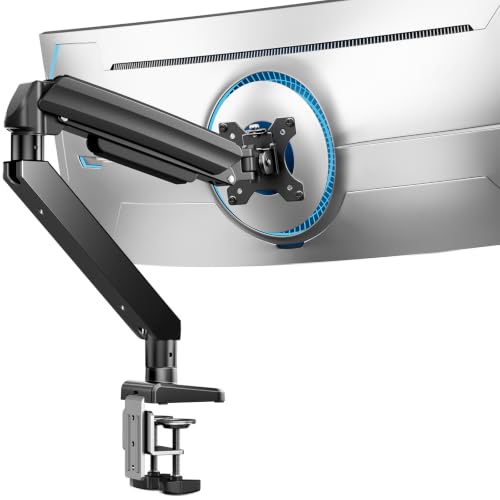
The ErGear model offers a wide size range for shoppers who may change monitors later. It supports screens from 13 to 49 inches and carries up to 37.4 pounds. That range covers many office displays, gaming monitors, and lighter ultrawide models. The product listing also highlights a full-motion design for users who need more than simple height adjustment.
This arm includes both a C-clamp and a grommet mounting option. That gives you more freedom when your desk has a suitable cable hole or when a clamp works better. It supports 75x75mm and 100x100mm VESA patterns, which are common sizes for many monitors. I see this as a flexible choice for mixed-use desks where the screen may change over time.
Pros:
- Supports a broad 13-to-49-inch screen range
- 37.4-pound capacity suits many large displays
- Includes both C-clamp and grommet mounting
- Supports common 75x75mm and 100x100mm VESA patterns
- Full-motion design allows more viewing changes
- Useful for office and gaming setups
Cons:
- Capacity is lower than the 44-pound models in this group
- Very heavy curved screens may need careful tension setup
- Grommet use depends on the desk hole size and location
What Amazon Buyers Are Saying
Common buyer themes for this ErGear mount focus on its value, broad monitor range, and choice of mounting methods. Buyers often like having a grommet option when they do not want the clamp to sit on the desk edge. The full-motion design is also useful for people who switch between sitting, standing, gaming, and collaborative viewing.
Some users may find that installation takes longer with a large screen or a thick desk. Buyers also need to set the arm tension to match the actual monitor weight. The 37.4-pound limit should be treated as a firm maximum, not a target, and the mount should not be used with a screen that exceeds its stated rating.
My Recommendation
The ErGear is worth considering if you want mounting flexibility and a wide compatibility range. I would pick it for a medium or moderately heavy ultrawide monitor, especially when a grommet base is important. It is not my first choice for the heaviest 49-inch displays, but it offers a strong balance of features and range.
VIVO STAND-V101V Heavy Duty Monitor Arm
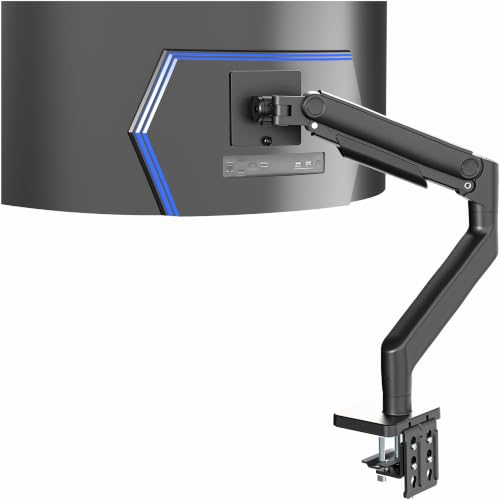
The VIVO STAND-V101V targets users with very large ultrawide displays. It is rated for screens up to 49 inches and supports up to 44 pounds. The listing describes it as an aluminum tension arm designed for large screens such as the Samsung Odyssey G9 and similar monitors. This makes it a direct match for buyers who want a dedicated mount for a wide curved display.
A tension arm must be adjusted to the weight of the monitor for smooth movement and steady positioning. That adjustment matters even when the mount has a high rated capacity. The VIVO design is best suited to a desk that can handle a large base and a screen with a compatible VESA connection. Because the supplied product details do not list the VESA pattern, I would verify that measurement before purchase.
Pros:
- Supports ultrawide screens up to 49 inches
- Rated for up to 44 pounds
- Aluminum arm gives the mount a premium look
- Designed with large curved displays in mind
- Good fit for Samsung Odyssey G9-style setups
- Strong choice for users who want a single-screen mount
Cons:
- VESA compatibility should be confirmed before ordering
- Large monitors may require careful tension adjustment
- Not the best match for a small, light display
What Amazon Buyers Are Saying
Buyer interest in this VIVO arm tends to come from owners of large curved and ultrawide monitors. Users in that group usually care most about weight support, a clean desk, and the ability to position a wide screen at a comfortable height. The aluminum construction also appeals to shoppers who want a mount that matches a premium gaming or work setup.
The most important real-world check is compatibility. Large monitors vary in rear mounting position, weight distribution, and center of gravity. Buyers should review the current Amazon listing, confirm the VESA pattern, and measure the desk before purchase rather than relying on screen size alone.
My Recommendation
I recommend the VIVO STAND-V101V for a heavy 49-inch ultrawide when its mounting measurements fit your monitor and desk. Its 44-pound rating makes it one of the stronger choices here. I would place it just behind the HUANUO for overall flexibility because the supplied details do not state the VESA size.
WALI GSM001XLN Ultrawide Monitor Arm
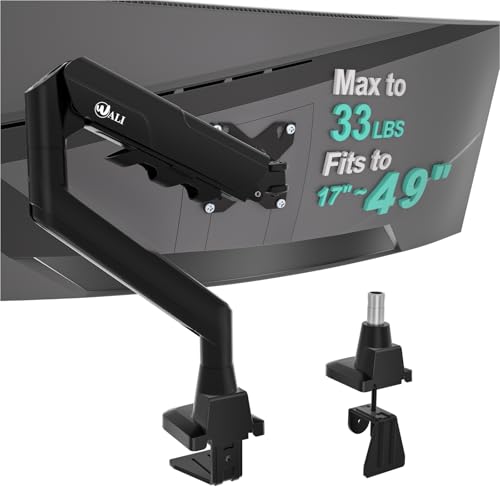
The WALI GSM001XLN is a practical option for curved monitors from 17 to 49 inches. Its maximum load is 33 pounds, so it fits many large screens but leaves less weight headroom than the 44-pound models. It supports 75mm and 100mm VESA mounting patterns. The arm includes tilt, swivel, and rotation functions for users who want more control over screen position.
WALI also includes C-clamp and grommet base options. That helps the arm fit more desk layouts, provided the work surface can safely support the load. The 33-pound limit makes it important to check the monitor’s weight without its original stand. I would consider this model for a lighter ultrawide, office display, or gaming screen where full movement matters.
Pros:
- Fits screens from 17 to 49 inches
- Supports up to 33 pounds
- Includes tilt, swivel, and rotation
- Offers C-clamp and grommet installation
- Supports 75mm and 100mm VESA patterns
- Good option for lighter curved ultrawide monitors
Cons:
- Lower weight capacity than the 44-pound alternatives
- Not ideal for the heaviest 49-inch monitors
- Large curved screens may need careful balance checks
What Amazon Buyers Are Saying
Buyers who choose this WALI arm often value its broad movement range and flexible mounting options. Tilt, swivel, and rotation can help users reduce glare or turn the screen toward another person. The 33-pound rating also gives it a useful place between ordinary monitor stands and the largest heavy-duty mounts.
The key limitation is weight, not screen size alone. A 49-inch display can weigh more than a smaller monitor, so buyers should compare the exact monitor weight with the arm rating. Some setups may also need extra care during installation because a wide curved panel can place more leverage on the desk mount.
My Recommendation
The WALI is a good value choice for a lighter ultrawide monitor. I like its movement options and dual mounting approach, but I would not use it for a screen close to the 33-pound limit without checking the desk and balance with care. It is a sensible pick when you want flexibility at a lower capacity.
MSI MAG MT201 Heavy Duty Monitor Arm

The MSI MAG MT201 is a premium single-monitor arm for users who want a clean and adjustable setup. It supports 17- to 49-inch screens and carries up to 44 pounds. The spring-assisted design is intended to help with screen positioning and adjustment. MSI also lists both clamp and grommet mounting, which gives the arm wider desk compatibility.
A quick-release plate can make monitor installation less awkward, especially when one person handles a large screen. The arm is VESA compatible, but buyers should confirm the exact pattern and any size limits in the current listing. This model stands out for its combination of high capacity, spring assistance, and quick-release hardware. It suits gaming desks and workstations where users adjust the display during the day.
Pros:
- Supports screens from 17 to 49 inches
- Handles up to 44 pounds
- Spring-assisted arm helps with adjustment
- Includes clamp and grommet mounting
- Uses a quick-release plate
- Strong fit for gaming and professional work desks
Cons:
- VESA details should be checked for the exact monitor
- Large screens can still require two-person installation
- Spring tension must match the monitor weight
What Amazon Buyers Are Saying
Buyer interest in the MSI MAG MT201 often comes from the brand, high weight rating, and quick-release design. Users who mount large gaming screens tend to value the ability to attach the plate first and then connect the monitor. The clamp and grommet options also help buyers fit the arm into different desk layouts.
As with other spring-assisted mounts, the best experience depends on correct tension. If the adjustment is too loose, the monitor may drift. If it is too tight, movement may feel stiff. Buyers should follow the setup steps, confirm the desk is solid, and avoid treating the 44-pound rating as a substitute for checking the actual monitor weight.
My Recommendation
I recommend the MSI MAG MT201 for buyers who want a polished heavy-duty mount with useful installation features. Its 44-pound capacity and quick-release plate make it a strong all-around choice. It earns a high score, though I would still verify the exact VESA pattern before buying.
How to Choose a Heavy Duty Monitor Arm
Choosing a heavy duty monitor arm takes more than matching the listed screen size. A large monitor can be light, while a smaller gaming display can be quite heavy. I always compare the screen weight, VESA pattern, desk strength, and mounting method before I look at extra features. These checks help prevent wobble, poor fit, and wasted money.
1. Match the Arm to the Monitor Weight
Start with the monitor weight without its factory stand. The stand does not hang from the arm, so it should not count toward the load. Leave some room below the maximum rating when possible. A monitor that weighs 30 pounds will place less strain on a 44-pound arm than on a 33-pound arm, but both may work if the listing supports that weight.
Do not use screen size as a substitute for weight. A 49-inch curved display has a wide body and can create more leverage than a small flat screen. Check the product page and your monitor manual for the exact weight. Also consider the position of the VESA holes, since an off-center mounting point can affect balance.
2. Confirm VESA Fit and Desk Mounting
VESA refers to the hole pattern on the back of the monitor. Common patterns include 75x75mm and 100x100mm. The arm and screen must share a compatible pattern. If the product listing does not show the exact VESA range, check before ordering. A high weight rating cannot fix a mounting pattern that does not fit.
Next, inspect your desk. A C-clamp needs a solid edge and enough room for its jaws. A grommet mount needs a suitable hole in the desk. Avoid mounting a heavy display to a weak, hollow, cracked, or very thin surface. If the desk flexes under hand pressure, it may also move under the leverage of an ultrawide monitor.
3. Compare Movement, Tension, and Long-Term Value
Think about how you use the screen. If you sit in one place, height adjustment may be enough. If you share the screen, switch between work and gaming, or fight window glare, tilt and swivel become more useful. Rotation can help in some setups, but a very wide curved monitor may not suit portrait use.
Heavy duty monitor arms often use springs or tension controls. These parts must match the screen weight. A good arm should hold the monitor in place after adjustment, but no mount should be expected to move perfectly without setup. Look for cable management, a quick-release plate, and clear hardware instructions when those features matter to you.
Finally, compare capacity with price. The highest rating is not always the best value for a 15-pound office monitor. On the other hand, saving money on a light mount can cause trouble with a heavy ultrawide. I prefer an arm with useful weight headroom, a strong base, and a return policy that lets me confirm the fit.
Final Verdict: Which Should You Buy?
For most large ultrawide screens, I would choose the HUANUO TitanLift or MSI MAG MT201. Both offer a 44-pound rating. The HUANUO stands out for its dual C-clamp, while MSI adds spring assistance and a quick-release plate.
The best heavy duty monitor arm is the one that fits your monitor and desk with room to spare. Check weight, VESA size, desk strength, and mounting space before ordering.
FAQs Of heavy duty monitor arm
What weight can a heavy duty monitor arm hold?
These models support between 33 and 44 pounds. Always compare the stated limit with your monitor’s weight without its original stand.
Can a monitor arm hold a 49-inch ultrawide?
Yes. Each model reviewed here lists support for screens up to 49 inches, but you must also confirm the weight, VESA pattern, and desk strength.
Is a C-clamp or grommet mount better?
Neither is always better. A C-clamp fits a suitable desk edge, while a grommet mount works through a compatible desk hole and may offer a cleaner setup.
What VESA size do most monitor arms use?
Many arms support 75x75mm and 100x100mm patterns. Check the monitor and arm specifications before purchase because compatibility varies.
Will a heavy duty monitor arm stop monitor wobble?
A strong arm can reduce movement, but the desk also matters. A weak or flexible desk may still wobble under a large monitor.
Do I need to adjust arm tension?
Usually, yes. Set the tension to match the monitor’s weight so the arm stays in position and moves with suitable resistance.